



TL;DR
AI customer support scalability for growing businesses is about handling rising customer volumes without increasing headcount, operational costs, and complexity at the same rate. The strongest platforms combine AI-powered automation with human handoff, knowledge management, omnichannel support, quality assurance, and integrations to help teams maintain service quality as they grow. In this guide, we compare 10 scalable AI customer service solutions and explain which platforms are best suited to different growth needs.
Growth is good for business, but it can quickly expose weaknesses in your customer support operation. More customers mean more questions, more support interactions, and higher expectations, while your team is still expected to respond quickly and deliver consistent service quality.
Adding more support agents can help absorb the extra demand, but it also increases customer service costs and operational complexity. Meanwhile, expanding across multiple channels can leave teams juggling disconnected support systems, fragmented knowledge, and limited visibility into customer interactions.
This is where scalable AI customer support can make a difference. Platforms such as BlueTweak combine AI-powered support with human expertise, helping businesses automate appropriate customer queries while keeping human agents involved when customers need more complex or personalized support.
But not every AI customer service platform is designed with growth in mind. The right solution needs to do more than automate routine tasks. It should help your support team handle higher volumes, maintain service quality, and gain greater operational efficiency without sacrificing the customer experience.
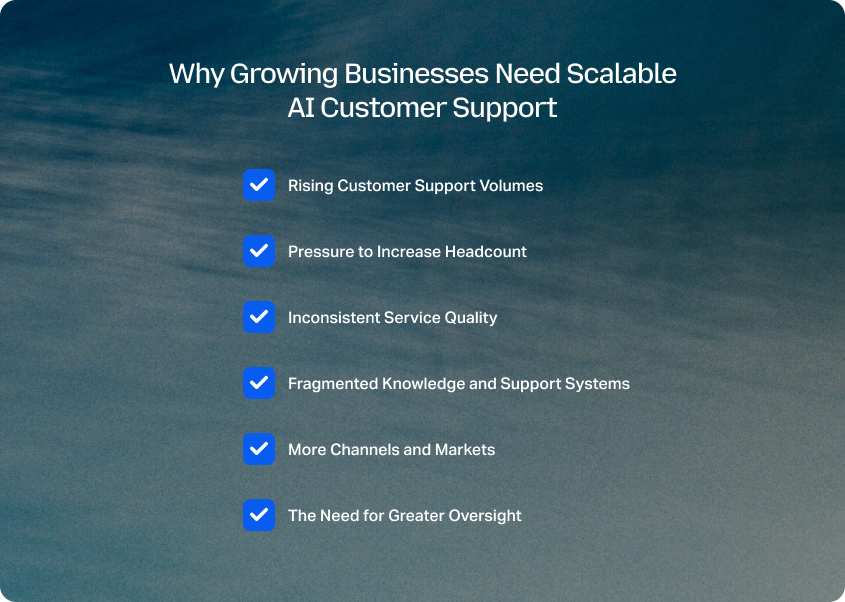
Why Growing Businesses Need Scalable AI Customer Support
As a business grows, customer support demand rarely increases in a neat, predictable way. New products, markets, channels, and customer segments can all create additional customer requests, while customer expectations continue to rise.
For customer service leaders, that creates a difficult balancing act: how do you increase support capacity without allowing costs and complexity to grow at the same rate?
Traditional support systems often rely heavily on adding human agents to absorb higher volumes. That approach can work for a while, but eventually creates pressure across hiring, training, management, quality assurance, and operational costs. A growing support team can also make it harder to maintain consistent service across customer conversations and channels.
Scalable AI customer support addresses this challenge by allowing businesses to increase their capacity without relying solely on additional headcount. AI can take on suitable, repetitive interactions, retrieve information, support self-service, and help route customer requests, while human agents remain available for conversations that require judgment, empathy, or human intervention.
Rising Customer Support Volumes
As customer numbers increase, so does the volume of customer queries. Support teams may find themselves spending an increasing proportion of their time handling repetitive questions about orders, accounts, billing, product information, or common troubleshooting issues.
Without automation, every additional interaction requires capacity from a support agent. This can lead to longer response times, growing backlogs, and frustrated customers during periods of high volume.
AI-powered customer support can help by handling appropriate routine interactions at scale. This gives support teams more capacity to focus their human expertise where it has the greatest impact on the customer experience.
Pressure to Increase Headcount
Hiring more support agents is an obvious response to growing demand, but it is not always the most scalable one. Each new employee brings additional salary, training, management, and onboarding requirements, and hiring may not keep pace with sudden increases in customer demand.
Scalable AI customer service solutions can provide additional support capacity without requiring a proportional increase in headcount. The goal isn't to remove human agents from the customer support operation. Instead, AI can reduce the volume of routine work reaching support agents, enabling the existing team to spend more time on complex customer needs.
Inconsistent Service Quality
Scaling a customer service team can also make consistency harder to maintain. More agents, more shifts, more channels, and more markets create more opportunities for differences in processes, responses, and customer interactions.
A scalable AI customer support platform can help create more consistent support by giving AI and human agents access to the same approved knowledge and support processes. Quality assurance and analytics can then help customer service leaders identify where service quality is improving and where further intervention is needed.
Fragmented Knowledge and Support Systems
Growth often means adding more tools. A business may introduce new communication channels, knowledge bases, CRM systems, analytics platforms, and automation tools as its support operation expands.
Over time, this can create fragmented information and additional administrative work for support teams. Agents may need to switch between systems to find information, while managers have to reconcile data from multiple sources to understand customer support performance.
Scalable AI customer service platforms can reduce some of this complexity by connecting customer interactions, knowledge, automation, and support workflows within a more unified operating environment.
More Channels and Markets
Growing businesses frequently expand beyond a single support channel or market. Customers may expect help through email, chat, voice, or other channels, while international growth introduces additional languages and customer needs.
Supporting every new channel or market by adding another separate workflow can quickly increase operational complexity. Scalable customer service instead requires an infrastructure that can support higher interaction volumes and broader channel coverage while preserving a consistent customer experience.
The Need for Greater Oversight
More automation does not automatically mean better customer support. As AI handles a greater share of customer interactions, leaders need visibility into what it is doing, where it is succeeding, and when human intervention is required.
That makes capabilities such as quality assurance, analytics, knowledge management, and human handoff increasingly important. A scalable AI customer support solution should give businesses a way to increase automation while retaining control over service quality and the overall customer support experience.
Ultimately, scaling customer support isn't simply about handling more conversations. It's about increasing support capacity while maintaining customer satisfaction, consistent service, and operational control. The best scalable AI customer support solutions are designed to help businesses achieve that balance.
10 Best Scalable AI Customer Support Solutions for Growing Businesses
The best platform depends on what is driving your support operation's growth. A business expanding across multiple channels has different requirements from an e-commerce brand dealing with a high volume of order-related questions, while a company already invested in a CRM may prioritize native customer context over standalone support functionality.
For this comparison, we evaluated platforms based on their ability to support growth across AI automation, human handoff, knowledge management, omnichannel support, quality assurance, integrations, and operational scalability.
| Platform | Best for | AI automation | Omnichannel support | Knowledge management | QA and analytics |
|---|---|---|---|---|---|
| BlueTweak | Growing support operations that need controlled AI adoption | Yes | Yes | Yes | Yes |
| Zendesk | Mature, complex support operations | Yes | Yes | Yes | Yes |
| Intercom | AI-first conversational support | Yes | Yes | Yes | Yes |
| Freshdesk | Growing teams seeking broad help desk functionality | Yes | Yes | Yes | Yes |
| Salesforce Service Cloud | Salesforce-centric enterprises | Yes | Yes | Yes | Yes |
| HubSpot Service Hub | Businesses already using HubSpot | Yes | Yes | Yes | Yes |
| Gorgias | Ecommerce and Shopify-focused support | Yes | Yes | Yes | Yes |
| Kustomer | Customer-centric, high-volume support | Yes | Yes | Yes | Yes |
| Front | Collaborative customer communication | Yes | Yes | Yes | Yes |
| Help Scout | Simpler support operations | Yes | Yes | Yes | Yes |
Disclaimer: Pricing, features, integrations, and AI capabilities can change as vendors update their products and plans. The comparison above provides a high-level snapshot based on publicly available information at the time of writing. Check each provider's current documentation and pricing before making a purchasing decision.
The table gives you a quick way to narrow down the options, but the right scalable AI customer support solution depends on how your support operation is growing and where its biggest constraints lie. The detailed breakdowns below look at each platform's key capabilities, advantages, limitations, pricing, and ideal use case to help you make a more informed decision.
1. BlueTweak: Best for Scaling Support Without Scaling Complexity

BlueTweak is an AI customer support platform designed for growing businesses that need to increase support capacity without adding the same level of headcount and operational complexity. Its approach combines AI assistance, human-approved responses, and autonomous AI capabilities, giving businesses control over how quickly they introduce automation.
Rather than treating AI autonomy as the end goal, BlueTweak provides a path from agent assistance to human-approved AI and, where appropriate, autonomous resolution. This makes it particularly relevant to customer service leaders who want to increase automation while retaining control over customer interactions and service quality.
Key features
- AI-powered customer support: AI can assist with customer conversations and automate appropriate routine interactions, helping support teams increase capacity without relying solely on additional agents.
- Omnichannel support: Email, chat, and voice support are brought into one platform, helping teams manage multiple channels without creating separate operational silos.
- Knowledge management: A centralized knowledge base gives AI and human agents access to consistent information, supporting more accurate and consistent customer interactions.
- Human handoff: Support teams can retain human intervention for complex, sensitive, or high-value customer conversations rather than forcing every interaction through automation.
- Quality assurance: QA capabilities help customer service leaders monitor support interactions and maintain service quality as automation and support volumes increase.
- Analytics and workforce management: Operational data and workforce management capabilities provide visibility into support performance and help teams plan capacity as demand changes.
- Multilingual support: The platform supports customer service across multiple languages, helping growing businesses expand their support operations without creating an entirely separate technology stack for each market.
“The challenge with scaling customer support isn’t simply handling more conversations. As businesses grow, they often add more channels, AI tools, and specialist systems, creating a fragmented operation that becomes increasingly expensive and difficult to manage. Bringing AI, voice, messaging, knowledge, workforce management, and quality assurance together in one platform can give support teams greater visibility, more consistent customer experiences, and better control over operational costs.” — Radu Dumitrescu, Head of Automation & Digital Transformation, BlueTweak
Pros
- One operational system: AI, knowledge management, QA, workforce management, analytics, and customer interactions can be managed within one platform.
- Controlled AI adoption: Businesses can increase automation progressively instead of being pushed toward fully autonomous AI from day one.
- Built for operational scalability: BlueTweak is positioned around increasing support capacity while maintaining consistent service quality and reducing operational overhead.
Cons
- Smaller ecosystem: BlueTweak has a smaller integration ecosystem than major enterprise incumbents.
- Less established: Businesses that prioritize the scale and market presence of a large incumbent may prefer a more established vendor.
- Potentially more functionality than smaller teams need: Organizations with very simple support operations may not require the breadth of capabilities offered by the platform.
Pricing
BlueTweak's pricing starts at €65 per agent per month when billed annually, with email, chat, and voice included alongside its core features. AI capabilities are available as usage-based add-ons, including conversational AI for chat at €0.20 per fully resolved chat session, AI-proposed ticket replies at €0.40 per email thread, and conversational AI for voice at €0.09 per minute when the AI completes the call without agent intervention. AI add-ons can be enabled or disabled as needed.
Want to see what AI-powered support could save your business? Use BlueTweak's ROI calculator to estimate the potential impact on support capacity, efficiency, and operational costs.
Best for
Growing customer support operations that need to increase AI automation while retaining control over human intervention, service quality, and operational complexity.
Ready to scale your customer support without scaling your headcount? Try BlueTweak free for 14 days, no credit card required, and see how AI-powered customer support can increase capacity while keeping your team in control.
2. Zendesk: Best for Mature and Complex Support Operations

Zendesk is one of the more established customer service platforms, combining ticketing, workflows, knowledge management, reporting, AI, and a broad integration ecosystem. Its breadth makes it a strong option for organizations where customer support has already developed into a complex, multi-team operation.
Its scalability advantage comes from the depth of its support infrastructure. Businesses can build increasingly sophisticated workflows around customer interactions, automation, reporting, and AI without necessarily replacing their existing support environment.
Key features
- AI agents: AI can handle customer interactions and support automation across the customer service workflow.
- Ticketing and workflows: Structured ticketing and workflow automation help teams manage increasing volumes consistently.
- Knowledge management: Help center and knowledge capabilities provide information for self-service and AI-powered support.
- Omnichannel support: Multiple customer communication channels can be managed through the broader Zendesk environment.
- Analytics and reporting: Reporting gives customer service leaders visibility into support performance and operational trends.
- Integrations: A large ecosystem allows Zendesk to connect with CRM, business, and customer experience systems.
Pros
- Mature platform: Extensive functionality makes Zendesk suitable for complex support operations.
- Broad ecosystem: A large marketplace and integration ecosystem can support organizations with sophisticated technology stacks.
- Strong scalability: Its depth of workflows, reporting, and support functionality makes it suitable for larger teams and increasingly complex operations.
Cons
- Complexity: The breadth of functionality can make implementation and administration more involved.
- Cost can increase with requirements: Organizations may need higher-tier plans or additional functionality as their support operation becomes more sophisticated.
- Potentially more platform than smaller teams need: Smaller growing businesses may not need the full breadth of an enterprise-oriented support platform.
Pricing
Zendesk uses plan-based pricing, with AI and advanced capabilities varying by package and configuration. Zendesk's Suite plans start at $55/agent/month for Suite Team, rising to $89 for Suite Growth and $115 for Suite Professional (annual billing). Because pricing and packaging can depend on the specific products, seats, and AI capabilities required, businesses should check Zendesk's current pricing before comparing total costs.
Best for
Established customer support operations that need a mature platform with extensive workflows, integrations, reporting, and AI capabilities.
3. Intercom: Best for AI-First Conversational Support

Intercom takes an AI-first approach to customer service, combining its help desk and messaging environment with Fin AI Agent. Its platform is particularly suited to digital and SaaS businesses that want customer conversations, automation, knowledge, and AI closely connected.
Fin can be used as part of Intercom or, in some circumstances, with an existing help desk, allowing businesses to introduce AI without necessarily replacing their entire support infrastructure.
Key features
- Fin AI Agent: AI can resolve customer interactions and execute configured procedures, with human handoff available when required.
- AI Copilot: AI assistance helps human agents work more efficiently within the inbox.
- Omnichannel support: Intercom supports live chat, email, in-app messaging, and additional channels through its plans and usage-based options.
- Knowledge Hub: Centralized knowledge supports both customer self-service and AI-powered answers.
- Workflows: Automation and routing tools help teams manage customer requests at higher volumes.
- Reporting: Reporting and dashboards provide visibility into customer service activity and AI performance.
- Multibrand support: Higher-tier plans include capabilities designed for larger teams managing multiple brands.
Pros
- Strong AI focus: Fin is deeply integrated into the customer service platform rather than being a separate chatbot add-on.
- Good conversational experience: Intercom is particularly strong for businesses where customer engagement happens through digital conversations.
- Flexible deployment: Fin can also be used with some existing help desks, providing a route to AI adoption without an immediate platform migration.
Cons
- Usage-based AI costs: Fin is charged per outcome, so growing AI usage can create an additional variable cost.
- Advanced features require higher plans: Capabilities such as multibrand support and workload management are reserved for higher tiers.
- Can become expensive at scale: Seat pricing plus AI and channel usage means businesses need to model total costs rather than looking only at the base subscription.
Pricing
Intercom's current annual pricing starts at $29 per seat per month for Essential, $85 for Advanced, and $132 for Expert, with Fin AI Agent charged from $0.99 per outcome. Additional charges can apply for channels and other add-ons.
Best for
SaaS and digital businesses that want AI-first conversational customer service closely integrated with messaging, knowledge, and customer engagement.
4. Freshdesk: Best for growing teams seeking broad help desk functionality
Freshdesk combines traditional help desk functionality with Freshworks' Freddy AI capabilities. This makes it a practical option for businesses that want to introduce AI into an established customer support workflow rather than adopting an AI-first platform from scratch.
Its broad help desk functionality can provide a foundation for scaling ticket volumes, while AI capabilities can help automate repetitive work and support human agents.
Key features
- Freddy AI: AI capabilities support customer-facing automation and agent productivity.
- Ticket management: Structured ticketing helps teams organize and prioritize growing customer request volumes.
- Knowledge base: Self-service and knowledge management can reduce repetitive questions reaching support agents.
- Workflow automation: Automation helps route and manage repetitive support processes.
- Reporting: Support analytics help leaders monitor team and operational performance.
- Integrations: Freshdesk connects with other business systems to provide additional customer context.
Pros
- Broad help desk functionality: Provides a familiar foundation for growing support teams.
- AI alongside human support: AI can augment agents rather than requiring a completely autonomous support model.
- Suitable for growing teams: Freshdesk can support organizations as their ticket volumes and workflows become more sophisticated.
Cons
- Feature tiers matter: Some advanced functionality may require higher-tier plans or additional products.
- AI packaging can add complexity: Businesses need to understand which AI capabilities are included and which are usage-based.
- Less specialized than some alternatives: Ecommerce, conversational, or enterprise-specific use cases may be better served by more specialized platforms.
Pricing
Freshworks' pricing and Freddy AI packaging vary by product and plan, so the total cost should be evaluated against the specific automation, reporting, and AI capabilities required. Plans for Freshdesk start with their Growth plan at $19 per agent, per month, billed annually, with their Pro and Enterprise plans starting at $55 and $89 per agent, per month, respectively.
Best for
Freshdesk is best for growing support teams that want established help desk functionality with AI capabilities layered into their existing customer service operations.
5. Salesforce Service Cloud: Best for Salesforce-Centric Enterprises

Salesforce Service Cloud is designed for organizations that want customer service closely connected to CRM data and wider business processes. For companies already using Salesforce, that shared customer context can be a significant scalability advantage.
Its AI capabilities are increasingly delivered through Agentforce, allowing organizations to combine customer-facing AI agents with employee-facing AI and Salesforce data.
Key features
- Agentforce: AI agents can support customer service and employee workflows.
- CRM integration: Customer interactions can be connected to broader customer and account data.
- Knowledge management: Salesforce knowledge capabilities support agents and AI with relevant information.
- Digital channels: Businesses can support customers across digital channels within the Salesforce environment.
- Analytics: Reporting and customer intelligence provide visibility into service performance.
- Workflow automation: Salesforce automation can connect support processes with wider business workflows.
Pros
- Deep CRM integration: Particularly powerful for businesses already invested in Salesforce.
- Enterprise scalability: Designed to support complex organizations, workflows, and large customer operations.
- Flexible AI deployment: Agentforce offers multiple pricing and deployment models as businesses scale AI usage.
Cons
- Implementation complexity: Salesforce can require significant configuration, administration, and specialist expertise.
- Potentially high total cost: Multiple products, AI usage, implementation, and administration can contribute to a substantial overall investment.
- Overkill for simpler operations: Smaller teams may not need the complexity of a Salesforce-based service environment.
Pricing
Salesforce Service Cloud currently starts at $25 per user per month for Starter Suite, while Pro Suite starts at $100 per user per month. Service Enterprise costs $175 per user per month, Unlimited costs $350 per user per month, and Agentforce 1 Service costs $550 per user per month, all billed annually. Salesforce also offers Agentforce for Service as an add-on at £100 per user per month, while additional AI, digital engagement, and other capabilities may carry separate costs. Because Salesforce's pricing varies significantly by edition, AI requirements, add-ons, and contract terms, businesses should assess the total cost of their required Service Cloud configuration rather than comparing the headline starting price alone.
Best for
Enterprise customer support operations already invested in Salesforce that need customer service, CRM data, automation, and AI within one ecosystem.
6. HubSpot Service Hub: Best for Businesses Already Using HubSpot
HubSpot Service Hub is a strong option for businesses that already use HubSpot as their CRM and want customer support connected to sales, marketing, and customer data. This shared environment can help growing teams avoid creating another isolated support system as they expand.
Its Customer Agent provides AI-powered support that can resolve inquiries and escalate cases when human expertise is required.
Key features
- Customer Agent: AI can handle customer inquiries and escalate more complex cases.
- Help desk workspace: A centralized workspace gives support teams a structured environment for managing customer requests.
- Knowledge base: Knowledge management supports self-service and AI-powered customer interactions.
- Ticket automation: Automation can reduce manual work around recurring support processes.
- CRM integration: Customer support operates within HubSpot's broader customer record.
- Reporting and analytics: Higher-tier capabilities provide more advanced visibility into support performance.
Pros
- Strong CRM context: Support teams can access customer information alongside sales and marketing activity.
- Accessible for growing businesses: HubSpot offers a progression from free tools through more advanced Service Hub plans.
- Connected customer journey: Support can operate alongside broader customer engagement workflows.
Cons
- Best value depends on existing HubSpot usage: Businesses outside the HubSpot ecosystem may have less reason to choose it.
- AI uses HubSpot Credits: Customer Agent and other AI features can consume credits, creating usage-related costs.
- Advanced capabilities require higher tiers: Features such as skill-based routing, conditional SLAs, and more advanced analytics are associated with higher plans.
Pricing
HubSpot Service Hub currently offers a free tier, while paid plans start from $10 per seat per month for Starter, $1,450 (for six seats), per month for Professional, and $4,700 per month for eight seats in the Enterprise plan, with AI usage tied to HubSpot Credits. Professional and Enterprise also have different included credit allowances.
Best for
Growing businesses already using HubSpot that want customer support, CRM data, AI, and customer engagement connected within the same platform.
7. Gorgias: Best for E-Commerce and Shopify-Focused Support
Gorgias is built specifically around ecommerce customer service, making it particularly relevant to brands dealing with high volumes of transactional customer requests. Its focus on ecommerce integrations and customer conversations makes it a strong choice for businesses where questions about orders, products, returns, and shipping make up a significant proportion of support demand.
Its AI Agent uses outcome-based pricing, meaning businesses pay for interactions the AI successfully resolves rather than simply paying for every AI interaction.
Key features
- AI Agent: Automates suitable ecommerce customer interactions and resolves routine requests.
- Ecommerce integrations: Connects support with ecommerce platforms and customer order information.
- Help desk: Centralizes customer conversations across supported channels.
- Automations: Rules and workflows help teams manage repetitive requests.
- Customer context: Agents can access relevant customer and order information within the support environment.
- Reporting: Analytics provide visibility into support volume and operational performance.
Pros
- Ecommerce specialization: Designed around the customer service needs of online stores.
- Strong transactional automation: Particularly useful for repetitive questions involving orders, shipping, returns, and similar requests.
- Outcome-based AI pricing: AI Agent is charged when it successfully automates an interaction, rather than simply for AI usage.
Cons
- Narrower use case: Its ecommerce orientation makes it less suitable for some non-commerce support operations.
- Usage-based costs: Businesses pay both help desk usage fees and additional AI automation fees when using AI Agent.
- Scaling costs need modelling: High-volume brands should forecast both ticket and AI-resolved interaction volumes.
Pricing
Gorgias uses usage-based pricing rather than charging per agent, with plans based on monthly ticket volumes and AI Agent interactions. On annual billing, the Basic plan starts at $77 per month and includes 300 help desk tickets and 30 automated interactions, while Pro costs $471 per month with 2,000 tickets and 190 automated interactions, and Advanced costs $1,227 per month with 5,000 tickets and 530 automated interactions. Gorgias also offers Starter and Enterprise plans with custom pricing. Additional usage is charged separately: help desk tickets beyond the included allowance cost $0.40 each on Basic and $0.36 each on Pro and Advanced, while extra AI Agent interactions cost $1.50 each; voice and SMS are available as paid add-ons.
Best for
Growing e-commerce businesses, particularly brands using Shopify, that need to automate high volumes of transactional customer support.
8. Kustomer: Best for Customer-Centric, High-Volume Support

Kustomer takes a customer-centric approach to support by organizing customer interactions around the broader customer relationship rather than treating every interaction as an isolated ticket.
That approach can become valuable as support volumes increase because agents need customer context to resolve issues efficiently. Instead of making customers repeat information across conversations, support teams can work from a more complete view of the relationship.
Key features
- Customer timeline: Gives agents broader visibility into customer interactions and history.
- AI-powered support: AI can assist with customer service and repetitive support tasks.
- Omnichannel conversations: Helps teams manage customer interactions across supported channels.
- Knowledge management: Provides information for agents and customer self-service.
- Workflow automation: Automates repetitive processes and support tasks.
- Analytics: Helps leaders monitor customer service performance.
Pros
- Customer-centric model: Useful for teams where understanding the full customer relationship is important.
- Strong context: Agents can access broader interaction history when handling customer requests.
- Suitable for high-volume support: The platform is designed around scaling customer service interactions.
Cons
- More specialized platform: Businesses looking for a simple shared inbox may not need its broader capabilities.
- Pricing is less transparent: Prospects may need to contact sales to establish the cost for their particular configuration.
- Implementation requires planning: Teams with complex customer workflows may need more setup before seeing the full benefit.
Pricing
Kustomer does not provide the same level of straightforward public pricing transparency as some smaller support platforms, so businesses will need to request a current quote based on their required seats, channels, AI capabilities, and other functionality.
Best for
High-volume customer support teams that need rich customer context and a customer-centric platform as their support operation grows.
9. Front: Best for collaborative customer communication
Front combines shared communication with customer service workflows, making it particularly useful for growing businesses where customer support overlaps with account management, operations, or other customer-facing teams.
Its AI capabilities are designed around a human-in-control model, with AI agents and AI assistants working alongside teams rather than treating automation as a replacement for collaborative customer communication.
Key features
- Shared inbox and ticketing: Gives teams a centralized environment for managing customer conversations.
- AI Autopilot: Handles more complex customer work across supported channels.
- AI Copilot: Provides real-time assistance to human agents.
- Smart QA: Uses AI-powered quality assurance to assess agent performance.
- Smart CSAT: Uses AI to help evaluate customer satisfaction at scale.
- Omnichannel support: Professional and Enterprise plans support channels including email, SMS, and social communication.
- Knowledge base: Higher-tier plans provide multilingual knowledge management.
Pros
- Human-in-control AI: Automation is designed to work alongside support teams rather than removing human oversight.
- Strong collaboration: Front is particularly useful when customer conversations cross team or departmental boundaries.
- Built-in QA and CSAT options: AI-powered quality and satisfaction capabilities support oversight as volume grows.
Cons
- AI features can increase costs: Several advanced AI capabilities are separate add-ons unless included in Enterprise.
- Omnichannel support starts at a higher tier: The Professional plan is required for broader omnichannel functionality.
- Less traditional help desk orientation: Teams wanting a conventional ticket-centric customer service platform may prefer a dedicated help desk.
Pricing
Front's current annual pricing starts at $25 per seat per month for Starter, $65 for Professional, and $105 for Enterprise. AI Autopilot starts at $0.05 per conversation, while Copilot and Smart QA are $20 per seat per month as add-ons, and Smart CSAT is $10 per seat per month as an add-on unless included in Enterprise.
Best for
Growing businesses where customer support is closely connected to account management, operations, and other collaborative customer-facing teams.
10. Help Scout: Best for Simpler Support Operations
Help Scout focuses on straightforward customer service, with shared inboxes, knowledge management, reporting, and AI capabilities designed to help support teams work more efficiently.
Its relative simplicity can be an advantage for growing businesses that want to introduce AI without taking on the implementation and administrative burden associated with a larger enterprise customer service platform.
Key features
- Shared inbox: Centralizes customer conversations for support teams.
- AI assistance: Helps agents handle customer interactions more efficiently.
- Knowledge base: Supports customer self-service and consistent access to support information.
- Automation: Reduces repetitive manual work around customer requests.
- Reporting: Provides visibility into support activity and team performance.
- Integrations: Connects the support operation with other business tools.
Pros
- Simple user experience: Easier to adopt than some more complex enterprise platforms.
- Strong for smaller growing teams: Provides core customer support functionality without requiring a highly complex implementation.
- Knowledge and self-service: Helps reduce repetitive interactions while giving customers access to information themselves.
Cons
- Less enterprise depth: Organizations with highly complex routing, workforce management, or global support requirements may outgrow it.
- Fewer advanced operational capabilities: Businesses looking for extensive QA, WFM, or complex enterprise workflows may need another platform.
- AI scalability depends on use case: Teams with very high-volume or highly complex support operations may benefit from a more comprehensive AI customer service platform.
Pricing
Help Scout offers tiered pricing, with the total cost depending on the plan, number of users, and AI capabilities required. Businesses should check current pricing and included AI functionality when comparing it with usage-based and enterprise platforms.
Best for
Small and mid-sized support teams that want a straightforward customer service platform with AI capabilities and room to grow without unnecessary complexity.
What Makes an AI Customer Support Solution Scalable?

Not every AI customer service platform is built to scale a growing support operation. Some automate a narrow set of customer queries, while others add AI capabilities to an existing help desk without addressing the wider operational complexity around knowledge, channels, quality assurance, and human handoff.
When evaluating scalable AI customer support solutions, look beyond the AI feature list. The right platform should increase support capacity while helping your team maintain service quality, control costs, and manage a growing volume of customer interactions.
Here are the capabilities that matter most.
AI Automation and Resolution
Automation is one of the main reasons businesses adopt AI customer support, but the important question is what the AI can actually do.
A scalable AI customer service solution should be able to handle appropriate routine tasks and customer requests without requiring a support agent to intervene every time. Depending on the platform, this could include answering common questions, retrieving information, summarizing conversations, classifying tickets, or resolving straightforward customer queries.
The goal isn't to maximize the number of interactions handled by AI. It's to remove repetitive work from support agents so they can focus their time on customer needs that require human expertise.
Human Handoff and Intervention
AI should increase the capacity of your support team, not leave customers trapped in an automated workflow when they need help from a person.
Look for solutions that make human intervention straightforward and allow support agents to take over when a customer conversation becomes too complex, sensitive, or outside the AI's capabilities. Clear handoff rules are particularly important as automation increases because they help customer service leaders maintain control over the customer support experience.
A strong scalable model is therefore AI and human agents working together, with each handling the interactions they are best equipped to manage.
Knowledge Management
AI customer support is only as useful as the information it can access. If your knowledge is inaccurate, outdated, or scattered across different systems, increasing automation can increase the risk of inconsistent or incorrect answers.
A scalable AI customer support platform should connect AI and human agents to reliable, controlled knowledge. This gives the AI a stronger foundation for customer conversations while giving support teams a consistent source of information as the operation grows.
Knowledge management also becomes more important when businesses expand into new products, markets, or channels. Instead of repeatedly training agents or updating separate systems, teams can maintain a central source of truth.
Omnichannel Support
Growing businesses rarely stay on one customer service channel. Customers may contact a company through email, chat, voice, or other digital channels, and those interactions can quickly become difficult to manage as volume increases.
A scalable customer service platform should support the channels your customers use without forcing your team to maintain completely separate workflows for each one.
Look for consistent routing, customer context, knowledge, and reporting across channels. This makes it easier for support operations to expand without creating another layer of operational complexity.
Quality Assurance and Oversight
More automation creates a new challenge: knowing whether AI is actually delivering good customer support.
Quality assurance should therefore extend beyond human agents. Customer service leaders need visibility into AI-handled interactions, including whether responses are accurate, whether customers are being escalated appropriately, and where customer sentiment or satisfaction may be deteriorating.
The strongest AI customer support solutions make it possible to monitor performance and use customer feedback to improve both automated and human-handled interactions.
Integrations and Customer Context
AI needs access to the information required to resolve customer requests effectively. That may include order details, account information, customer history, product information, or data from other business systems.
Integrations can therefore have a direct impact on scalability. If agents or AI systems have to move between multiple tools to understand a customer interaction, increasing support volume can increase operational overhead at the same time.
Look for integrations that allow your support operation to access relevant customer context without creating unnecessary administration or maintenance.
Multilingual Support
For businesses expanding into new markets, scalable AI customer service can provide additional capacity without requiring an equivalent increase in language-specific support resources.
Multilingual capabilities can help teams serve customers across different markets, but language coverage should be evaluated alongside accuracy, channel support, and human handoff. Translation alone isn't enough if the underlying customer support experience remains fragmented.
Operational Efficiency
Finally, consider what happens behind the customer interaction. A platform might automate customer requests successfully while still leaving managers with multiple systems to administer, separate reporting environments to reconcile, and additional tools to maintain.
True scalability means reducing operational friction as well as increasing automation. The more of your customer support operations that can be managed within a coherent system, the easier it becomes to expand without sacrificing visibility or service quality.
In short, the best scalable AI customer support solutions don't simply automate more conversations. They create more support capacity while keeping people, knowledge, channels, quality, and customer context connected.
Signs Your Customer Support Operation Is Becoming Difficult to Scale
You don't need to reach enterprise-level ticket volumes before your existing support setup starts creating problems. A growing business can become difficult to support long before its team considers itself a large customer service organization.
The warning signs are usually operational. If several of the following are familiar, your current support system may be approaching its scalability limits.
1. Ticket Volume is Growing Faster Than Your Team
More customers naturally create more customer requests, but hiring often takes longer than demand increases.
If support queues are growing faster than your team can handle them, adding agents may provide short-term relief but won't necessarily solve the underlying capacity problem.
The Fix: Use AI-powered customer support to handle suitable routine interactions and give human agents more capacity for complex conversations.
2. Hiring Has Become the Default Response to Growth
If every increase in customer volume leads to another hiring round, your support costs can rise alongside revenue.
A scalable operation should be able to absorb at least some additional demand without requiring a proportional increase in headcount.
The Fix: Identify repetitive customer queries that can be automated safely, then use human agents for interactions where judgment, empathy, or problem-solving adds greater value.
3. Agents Spend Too Much Time on Repetitive Work
Highly capable support agents can spend a significant amount of their day answering questions that don't require their full expertise.
Repeated requests about policies, account information, order status, or basic troubleshooting can consume capacity that would be better used on more complex customer needs.
The Fix: Introduce AI assistance or automation for appropriate routine tasks, while keeping human intervention available when the situation requires it.
4. Response Times Increase as Volume Rises
When demand increases without equivalent support capacity, response times are often among the first customer-facing metrics to suffer.
Longer waits can lead to frustrated customers, additional follow-up messages, and even more work for the support team.
The Fix: Use AI support and intelligent routing to reduce avoidable queues and direct customer conversations to the right resource more efficiently.
5. Knowledge is Scattered Across Multiple Systems
If agents have to search several tools, documents, or internal channels to find the right answer, scaling the team can make the problem worse.
New agents need more training, existing agents spend more time searching, and customers may receive inconsistent information.
The Fix: Establish a reliable knowledge source that can support both human agents and AI customer service tools.
6. Service Quality Varies Between Agents or Channels
Growth can introduce inconsistency. Different agents may follow different processes, while customers contacting you through different channels may receive different experiences.
This becomes especially challenging when support expands across teams, shifts, brands, or markets.
The Fix: Standardize knowledge and workflows, then use quality assurance and customer feedback to monitor whether service quality remains consistent.
7. Adding Another Channel Creates Another Workflow
Expanding from email into chat or voice should give customers more choice, not force your support team to maintain another disconnected operation.
If each channel has separate tools, data, reporting, and processes, operational complexity can quickly increase.
The Fix: Look for an omnichannel support solution that brings relevant customer interactions and workflows together.
8. Managers Struggle to See What's Happening Across Support
As customer support teams grow, it becomes harder to understand performance from isolated reports or manually assembled spreadsheets.
Leaders need to know not only how many conversations are being handled, but also whether customers are getting good outcomes.
The Fix: Use centralized analytics, customer feedback, and quality assurance to monitor the complete support operation.
9. AI is Being Added as Another Disconnected Tool
Adding an AI chatbot to an already fragmented support stack may automate one part of the customer journey while creating another system for agents and managers to maintain.
This can undermine the operational efficiency AI was supposed to improve.
The Fix: Evaluate whether AI is integrated into your broader customer support operations, including knowledge, routing, human handoff, analytics, and QA.
10. You Are Expanding Into New Markets
International growth can multiply support requirements. New languages, channels, operating hours, and customer expectations can all increase the resources needed to maintain a consistent customer experience.
The Fix: Consider AI customer service solutions with multilingual capabilities and a clear path to human support when customers need it.
The common thread is simple: if growth keeps creating more people, tools, queues, and processes at the same rate as customer demand, your support operation isn't scaling efficiently. The right AI customer support solution should help increase capacity without creating an equivalent increase in cost and complexity.
How to Choose the Right Scalable AI Customer Support Solution
Choosing the right scalable AI customer support solution means looking beyond the number of conversations a platform can automate. Growing businesses also need to consider how well the technology supports human agents, maintains service quality, connects customer information, and controls costs as support demand increases.
Assess your Current and Projected Support Volume
Start by looking at how much support demand you handle today and how that is likely to change as your business grows. Consider ticket volumes, peak periods, average response times, and the proportion of customer queries that could realistically be automated.
A scalable solution should give your team enough capacity to handle future demand without requiring a complete change of platform every time your support volume increases.
Look at AI Resolution, Not Just AI Assistance
AI customer service tools vary considerably in how they use automation. Some primarily help human agents draft responses, summarize conversations, or find information, while others can resolve customer requests without agent involvement.
Consider which level of automation makes sense for your operation and whether the platform allows you to increase AI involvement gradually. This gives your support team more control over where automation is appropriate and where human expertise remains important.
Check How Human Handoff Works
AI should not create another layer between customers and your support team. When a conversation requires empathy, judgment, specialist knowledge, or access to information the AI cannot confidently provide, customers should be able to reach a human agent without unnecessary friction.
Look for intelligent routing, clear escalation paths, and enough conversation context for agents to take over without asking customers to repeat themselves.
Evaluate Knowledge Management
AI-powered customer support is only as useful as the information behind it. Centralized, well-maintained knowledge gives AI systems and human agents a consistent source of information, helping reduce inaccurate responses and conflicting advice.
Look for solutions that make it easy to organize, update, and govern customer-facing knowledge as your products, policies, and markets change. A dedicated AI customer support knowledge base can be particularly valuable as support operations become more complex.
Consider Every Channel You Support
As businesses grow, customers often expect to contact them through multiple channels, including email, chat, messaging, and voice. Adding each channel as a separate workflow can quickly increase operational complexity.
An omnichannel customer support platform should allow teams to manage different customer interactions within a connected environment, while maintaining consistent service and customer context across channels.
Don't Overlook Quality Assurance
Higher support volumes make it harder for managers to manually review customer interactions. AI can increase capacity, but businesses still need visibility into whether automated and human interactions meet their service standards.
Look for quality assurance, interaction monitoring, analytics, and customer feedback capabilities that allow leaders to identify problems, measure performance, and continuously improve support quality.
Check Integrations and Customer Context
Your customer support platform shouldn't operate in isolation. Integrations with CRM, ecommerce, order management, communication, and other business systems can give AI and human agents the context they need to resolve customer requests efficiently.
The more customer information agents have to find manually, the more difficult it becomes to scale without increasing handling times and operational costs.
Calculate the Total Cost of Scaling
Finally, look beyond the headline subscription price. Consider how costs change as ticket volumes, AI usage, agents, channels, integrations, and advanced features increase.
A platform with a low starting price may become expensive at scale if every increase in customer demand creates a corresponding increase in seats or usage fees. The better option is the one that provides the right balance of automation, human support, functionality, and predictable costs for your expected growth.
Ultimately, the right scalable AI customer support solution should increase your team's capacity without creating an equivalent increase in people, tools, and operational complexity.
What Scalable AI Customer Support Should Look Like at Different Growth Stages

The right approach to AI customer support scalability can change as a business grows. A company dealing with a few hundred customer requests a month may have very different priorities from one managing thousands of interactions across multiple channels and markets.
| Growth stage | Common support challenge | What to prioritize |
|---|---|---|
| Early growth | Repetitive customer queries are consuming agent time | AI assistance, self-service, and knowledge management |
| Rapid growth | Ticket volumes and response times are increasing | AI automation, intelligent routing, and workflow efficiency |
| Multi-channel growth | Support teams are managing disconnected channels | Omnichannel support and centralized customer context |
| International growth | More languages, markets, and customer expectations | Multilingual support, centralized knowledge, and consistent service |
| Mature support operation | Maintaining quality while controlling costs | QA, analytics, workforce management, and AI governance |
Early Growth: Automate Repetitive Work
At an earlier stage, support teams may still be able to manage demand manually, but repetitive questions can quickly consume valuable agent time. AI assistance, self-service, and a reliable knowledge base can help teams resolve routine customer requests more efficiently while keeping human agents focused on issues that require judgment or expertise.
Rapid Growth: Increase Support Capacity
As customer volumes rise, response times can become harder to maintain and hiring more agents may become the default solution. This is where scalable AI customer support can provide additional capacity through automated resolution, intelligent routing, AI-assisted responses, and workflows that reduce repetitive work.
The goal isn't simply to automate as many interactions as possible. It's to increase the number of customer requests a team can handle while maintaining service quality.
Multi-Channel Growth: Connect the Customer Experience
Adding email, chat, voice, messaging, or social channels can help businesses meet changing customer expectations, but it can also create disconnected workflows. At this stage, an omnichannel support platform can help bring customer interactions together and give agents greater visibility across conversations and channels.
This becomes particularly important when customers move between channels or when multiple teams need to collaborate on the same customer request.
International Growth: Scale Consistency Across Markets
Expanding into new markets introduces additional complexity, including languages, customer expectations, products, and support requirements. AI-powered customer service can help teams provide multilingual support and consistent responses, while centralized knowledge and human oversight help ensure that automation remains aligned with local requirements and the broader customer experience.
Mature Operations: Optimize Quality and Efficiency
At a greater scale, simply handling more conversations isn't enough. Support leaders also need to understand how efficiently their operation is performing, where service quality is declining, and where automation is creating value.
Quality assurance, analytics, workforce management, customer feedback, and AI governance become increasingly important. Together, these capabilities help businesses scale support capacity while maintaining visibility and control.
The common principle at every stage is the same: scalable customer service should make it possible to handle more demand without allowing cost, complexity, or declining service quality to grow at the same rate.
How AI Helps Customer Support Scale Without Sacrificing Quality
Scaling customer support isn't simply about resolving more customer queries. As businesses grow, they need to increase support capacity while continuing to provide fast, accurate, and personalized service across every customer interaction.
AI-powered customer support can help make that possible by taking on appropriate routine tasks, assisting human agents, surfacing relevant knowledge, and routing more complex requests to the right people. With the right technology in place, support teams can handle higher volumes without relying entirely on additional headcount.
But automation alone isn't enough. The strongest scalable AI customer support operations combine AI with human expertise, centralized knowledge, omnichannel support, quality assurance, analytics, and the right integrations. This allows businesses to increase automation where it makes sense while maintaining human oversight where customers need empathy, judgment, or specialist support.
That's the difference between simply adding AI to a customer service operation and building a support function that is genuinely designed to scale.
BlueTweak brings AI-powered customer support, omnichannel interactions, knowledge management, quality assurance, workforce management, and analytics together in one platform. Its approach allows businesses to introduce AI progressively, from agent assistance and human-approved responses through to autonomous resolution where appropriate, while keeping teams in control of the customer experience.
Ready to scale customer support without scaling your headcount and complexity? Book a demo with BlueTweak to see how AI-powered support can help your team increase capacity while maintaining service quality.

As Head of Digital Transformation, Radu looks over multiple departments across the company, providing visibility over what happens in product, and what are the needs of customers. With more than 8 years in the Technology era, and part of BlueTweak since the beginning, Radu shifted from a developer (addressing end-customer needs) to a more business oriented role, to have an influence and touch base with people who use the actual technology.



